




1、Chart 目录结构
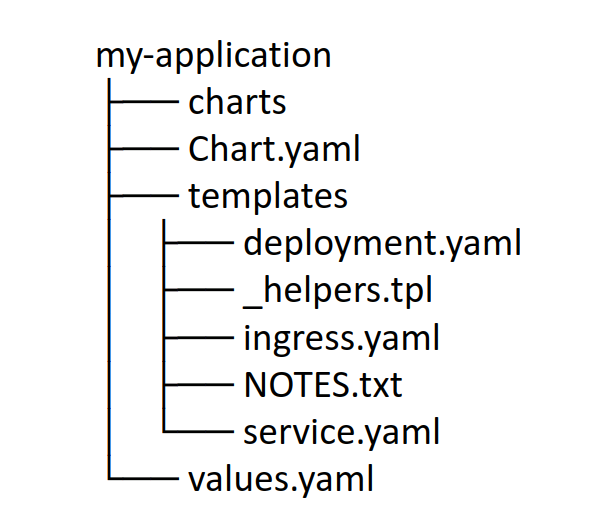
[root@k8s-master01 helmdir]# helm create foo
[root@k8s-master01 helmdir]# tree foo
foo
├── charts
├── Chart.yaml
├── templates
│ ├── deployment.yaml
│ ├── _helpers.tpl
│ ├── hpa.yaml
│ ├── ingress.yaml
│ ├── NOTES.txt
│ ├── serviceaccount.yaml
│ ├── service.yaml
│ └── tests
│ └── test-connection.yaml
└── values.yaml[root@master ~]# helm pull stable/mysql
[root@master ~]# tar xf mysql-1.6.8.tgz
[root@master ~]# ls mysql
Chart.yaml README.md templates values.yaml
[root@master ~]# ls -l mysql/templates/
total 48
-rwxr-xr-x 1 root root 292 Jan 1 1970 configurationFiles-configmap.yaml
-rwxr-xr-x 1 root root 8930 Jan 1 1970 deployment.yaml
-rwxr-xr-x 1 root root 1290 Jan 1 1970 _helpers.tpl
-rwxr-xr-x 1 root root 295 Jan 1 1970 initializationFiles-configmap.yaml
-rwxr-xr-x 1 root root 2036 Jan 1 1970 NOTES.txt
-rwxr-xr-x 1 root root 868 Jan 1 1970 pvc.yaml
-rwxr-xr-x 1 root root 1475 Jan 1 1970 secrets.yaml
-rwxr-xr-x 1 root root 328 Jan 1 1970 serviceaccount.yaml
-rwxr-xr-x 1 root root 800 Jan 1 1970 servicemonitor.yaml
-rwxr-xr-x 1 root root 1231 Jan 1 1970 svc.yaml
drwxr-xr-x 2 root root 50 Nov 13 18:43 tests2、创建不可配置的chart
2.1、创建目录与chart.yaml
[root@k8s-master01 ~]# mkdir -p /helm/nginx/templates
[root@k8s-master01 ~]# cd  /helm/nginx
[root@k8s-master01 nginx]# vim Chart.yaml
name: helm-nginx
version: 1.0.0
apiVersion: v1
appVersion: "1.0"
description: A Helm chart for Kubernetes2.2、创建deployment.yaml
[root@k8s-master01 nginx]# vim templates/deployment.yaml
apiVersion: apps/v1
kind: Deployment
metadata:
  name: helm-nginx
spec:
  replicas: 1
  selector:
    matchLabels:
      app: helm-nginx
  template:
    metadata:
      labels:
        app: helm-nginx
    spec:
      containers:
      - name: c1
        image: nginx:1.15-alpine
        imagePullPolicy: IfNotPresent
2.3、创建service.yaml
[root@k8s-master01 nginx]# vim templates/service.yaml
apiVersion: v1
kind: Service
metadata:
  name: helm-nginx
spec:
  selector:
    app: helm-nginx
  ports:
  - port: 80
    targetPort: 80
    protocol: TCP
2.4、使用chart安装应用
[root@k8s-master01 nginx]# helm install /helm/nginx --generate-name
NAME: nginx-1659144826
LAST DEPLOYED: Sat Jul 30 09:33:46 2022
NAMESPACE: default
STATUS: deployed
REVISION: 1
TEST SUITE: None
2.5、查看与验证
[root@k8s-master01 nginx]# helm ls
NAME                    NAMESPACE       REVISION        UPDATED                                 STATUS          CHART                   APP VERSION
nginx-1659144826        default         1               2022-07-30 09:33:46.881083524 +0800 CST deployed        helm-nginx-1.0.0
[root@k8s-master01 nginx]# kubectl get pods,service
NAME READY STATUS RESTARTS AGE
pod/helm-nginx-65f57fb758-nrpvf 1/1 Running 0 51s
pod/nfs-client-provisioner-9d46587b5-7n2vf 1/1 Running 4 (31m ago) 42h
NAME TYPE CLUSTER-IP EXTERNAL-IP PORT(S) AGE
service/helm-nginx ClusterIP 10.96.2.120 <none> 80/TCP 51s[root@k8s-master01 nginx]# curl http://10.96.2.120
<!DOCTYPE html>
<html>
<head>
<title>Welcome to nginx!</title>
<style>
html { color-scheme: light dark; }
body { width: 35em; margin: 0 auto;
font-family: Tahoma, Verdana, Arial, sans-serif; }
</style>
</head>
<body>
<h1>Welcome to nginx!</h1>
<p>If you see this page, the nginx web server is successfully installed and
working. Further configuration is required.</p>
<p>For online documentation and support please refer to
<a href="http://nginx.org/">nginx.org</a>.<br/>
Commercial support is available at
<a href="http://nginx.com/">nginx.com</a>.</p>
<p><em>Thank you for using nginx.</em></p>
</body>
</html>2.6、删除
[root@k8s-master01 ~]# helm uninstall nginx-1659144826
release "nginx-1659144826" uninstalled
3、创建可配置的Chart
3.1、官方的预定义变量
Release.Name:发布的名称(不是chart)
Release.Time:chart发布上次更新的时间。这将匹配Last ReleasedRelease对象上的时间。
Release.Namespace:chart发布到的名称空间。
Release.Service:进行发布的服务。
Release.IsUpgrade:如果当前操作是升级或回滚,则设置为true。
Release.IsInstall:如果当前操作是安装,则设置为true。
Release.Revision:修订号。它从1开始,每个都递增helm upgrade。
Chart:内容Chart.yaml。因此,chart版本可以Chart.Version和维护者一样获得 Chart.Maintainers。
Files:类似于chart的对象,包含chart中的所有非特殊文件。这不会授予您访问模板的权限,但可以访问存在的其他文件(除非使用它们除外.helmignore)。可以使用{{index .Files "file.name"}}或使用{{.Files.Get name}}或 {{.Files.GetStringname}}函数访问文件。您也可以访问该文件的内容,[]byte使用{{.Files.GetBytes}}
Capabilities:类似于地图的对象,包含有关Kubernetes({{.Capabilities.KubeVersion}},Tiller({{.Capabilities.TillerVersion}}和支持的Kubernetes API)版本({{.Capabilities.APIVersions.Has "batch/v1")的版本的信息
3.2、新增values.yaml文件
[root@k8s-master01 nginx]# pwd
/helm/nginx
[root@k8s-master01 nginx]# vim values.yaml
image:
  repository: nginx
  tag: '1.15-alpine'
replicas: 2
3.3、配置deploy引用values的值
[root@k8s-master01 nginx]# vim templates/deployment.yaml
apiVersion: apps/v1
kind: Deployment
metadata:
  name: helm-nginx
spec:
  replicas: {{ .Values.replicas }}
  selector:
    matchLabels:
      app: helm-nginx
  template:
    metadata:
      labels:
        app: helm-nginx
    spec:
      containers:
      - name: helm-nginx
        image: {{ .Values.image.repository }}:{{ .Values.image.tag }}
        imagePullPolicy: IfNotPresent
3.4、测试
3.4.1、直接应用测试
deployment.yaml将直接使用values.yaml中的配置
[root@k8s-master01 nginx]# helm install helm-nginx-new /helm/nginx
NAME: helm-nginx-new
LAST DEPLOYED: Sat Jul 30 09:44:21 2022
NAMESPACE: default
STATUS: deployed
REVISION: 1
TEST SUITE: None
[root@k8s-master01 nginx]# kubectl get pods
NAME READY STATUS RESTARTS AGE
helm-nginx-65f57fb758-pcmkg 1/1 Running 0 38s
helm-nginx-65f57fb758-rmmv5 1/1 Running 0 38s3.4.2、通过命令行设置变量后干运行测试
通过在命令行设置变量为deployment.yaml赋值,使用--set选项,使用
--dry-run选项来打印出生成的清单文件内容,而不执行部署
[root@k8s-master01 nginx]# helm install helm-nginx --set replicas=3 /helm/nginx/ --dry-run
NAME: helm-nginx
LAST DEPLOYED: Fri Nov 13 20:57:45 2020
NAMESPACE: default
STATUS: pending-install                                     状态表示是测试,不是真的部署了
REVISION: 1
TEST SUITE: None
HOOKS:
MANIFEST:
---
# Source: helm-nginx/templates/service.yaml
apiVersion: v1
kind: Service
metadata:
  name: helm-nginx
spec:
  selector:
    app: helm-nginx
  ports:
  - port: 80
    targetPort: 80
    protocol: TCP
---
# Source: helm-nginx/templates/deployment.yaml
apiVersion: apps/v1
kind: Deployment
metadata:
  name: helm-nginx
spec:
  replicas: 3                                               副本数量3传参成功
  selector:
    matchLabels:
      app: helm-nginx
  template:
    metadata:
      labels:
        app: helm-nginx
    spec:
      containers:
      - name: helm-nginx
        image: nginx:1.15-alpine                            镜像名:TAG 传参成功
        imagePullPolicy: IfNotPresent
[root@k8s-master01 nginx]# helm install helm-nginx --set replicas=3 /helm/nginx
NAME: helm-nginx
LAST DEPLOYED: Sat Jul 30 09:54:00 2022
NAMESPACE: default
STATUS: deployed
REVISION: 1
TEST SUITE: None[root@k8s-master01 nginx]# helm ls
NAME NAMESPACE REVISION UPDATED STATUS CHART APP VERSION
helm-nginx default 1 2022-07-30 09:54:00.744748457 +0800 CST deployed helm-nginx-1.0.0
[root@k8s-master01 nginx]# kubectl get pods,svc
NAME READY STATUS RESTARTS AGE
pod/helm-nginx-65f57fb758-j768m 1/1 Running 0 59s
pod/helm-nginx-65f57fb758-pscjh 1/1 Running 0 58s
pod/helm-nginx-65f57fb758-s6qqj 1/1 Running 0 58s
NAME TYPE CLUSTER-IP EXTERNAL-IP PORT(S) AGE
service/helm-nginx ClusterIP 10.96.1.197 <none> 80/TCP 59s3.4.3、将Chart包进行打包
将chart打包成一个压缩文件,便于存储与分享。
[root@k8s-master01 nginx]# helm package .
Successfully packaged chart and saved it to: /helm/nginx/helm-nginx-1.0.0.tgz
[root@k8s-master01 nginx]# ls
Chart.yaml helm-nginx-1.0.0.tgz templates values.yaml
打包出mychart-0.1.0.tgz文件

评论区